

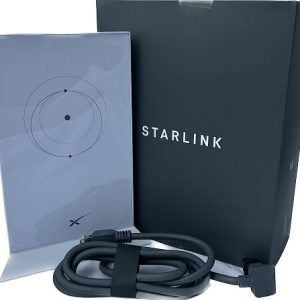
 Starlink Mesh Router V2 Wi-Fi Extender - for Rectangular Starlink Dish - SpaceX
 Subtotal: ₦259,995.00
NETWORKING, Networking devices
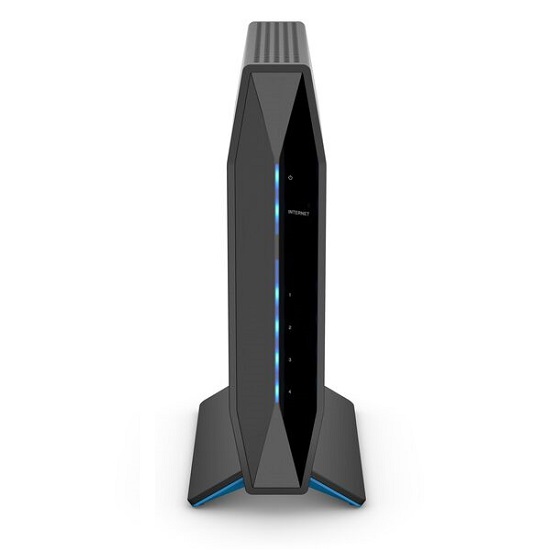
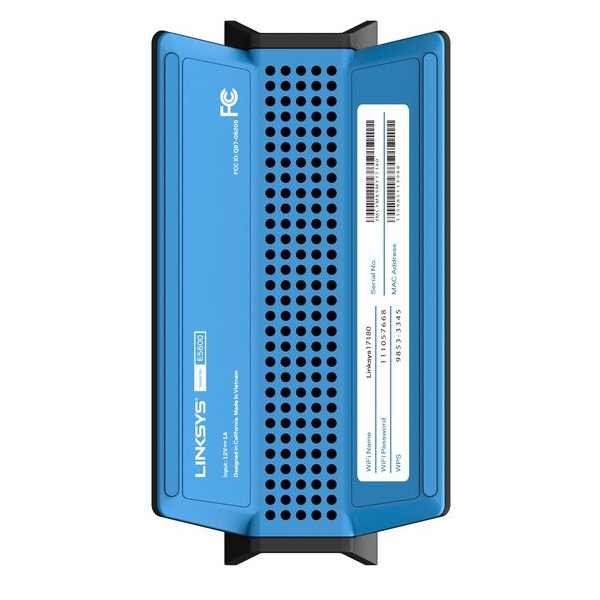
Linksys E5600 – Dual-Band AC1200 Wi-Fi 5 Router
Linksys E5600 – Dual-Band AC1200 Wi-Fi 5 Router
Reliable dual-band AC1200 Wi-Fi 5 router delivering fast, consistent wireless connectivity for everyday home and small office networking needs at an accessible price point.
The Linksys E5600 delivers combined wireless speeds of up to 1200Mbps (300Mbps on 2.4GHz + 867Mbps on 5GHz) with 802.11ac Wi-Fi 5 technology for smooth streaming, browsing, and online activities. This compact router features four external antennas for extended coverage, 4 Fast Ethernet LAN ports, Linksys Smart Wi-Fi setup, and MU-MIMO technology for simultaneous multi-device connections. Easy setup via Linksys app with no technical expertise required. Compatible with Velop mesh systems for whole-home coverage expansion. Perfect for apartments, small homes, and small offices requiring reliable everyday wireless connectivity with straightforward setup and management.
Specifications:
- Wi-Fi Standard: 802.11ac (Wi-Fi 5) dual-band
- Speed: AC1200 (300Mbps 2.4GHz + 867Mbps 5GHz)
- Antennas: 4 x external
- LAN Ports: 4 x Fast Ethernet (100Mbps)
- WAN Port: 1 x Fast Ethernet (100Mbps)
- MU-MIMO: Yes
- Beamforming: Yes
- Security: WPA2/WPA3
- Management: Linksys app + web interface
- Dimensions: Compact desktop design
Reliable everyday Wi-Fi 5 for homes and small offices.
₦49,995.00
Linksys E5600 – Dual-Band AC1200 Wi-Fi 5 Router
The Linksys E5600 Dual-Band AC1200 Wi-Fi 5 Router provides reliable, easy-to-use wireless connectivity for homes and small offices seeking dependable internet access for everyday activities including streaming, browsing, video calls, and smart home device management.
This straightforward router combines proven Wi-Fi 5 technology with Linksys’s user-friendly setup experience, making professional-grade wireless networking accessible to users of all technical backgrounds.
Key Features
- AC1200 dual-band Wi-Fi 5 (802.11ac)
- 300Mbps on 2.4GHz + 867Mbps on 5GHz
- MU-MIMO for multi-device performance
- Beamforming for focused signal delivery
- 4 external antennas for coverage
- Easy Linksys app setup
- WPA2/WPA3 security
- Velop mesh compatible
Wireless Performance
Dual-Band Speeds:
- 2.4GHz band: Up to 300Mbps
- 5GHz band: Up to 867Mbps
- Combined: Up to 1200Mbps
- 802.11ac Wi-Fi 5 standard
- Backward compatible (802.11a/b/g/n)
MU-MIMO Technology:
- Multiple simultaneous device connections
- Reduces device wait times
- Better multi-user performance
- Efficient spectrum usage
- Improved overall throughput
Beamforming:
- Focused signal to devices
- Enhanced connection stability
- Extended effective range
- Improved speeds at distance
- Works with all Wi-Fi devices
Antenna System
4 External Antennas:
- Enhanced signal coverage
- Better wall penetration
- Adjustable positioning
- Extended range vs. internal antennas
- Omni-directional pattern
- Consistent coverage area
Coverage:
- Up to ~1,500 sq ft
- Single-story home coverage
- Small apartment coverage
- Small office deployment
- Consistent room-to-room
Wired Connectivity
LAN Ports:
- 4 x Fast Ethernet (10/100Mbps)
- Connect wired devices directly
- Smart TVs and gaming consoles
- Desktop PCs
- Network printers
WAN Port:
- 1 x Fast Ethernet (10/100Mbps)
- Connects to modem
- Compatible with all ISPs
- Cable, DSL, fiber connections
Linksys Smart Wi-Fi Setup
Easy Installation:
- Download Linksys app
- Connect router to modem
- Follow guided setup
- Create network name and password
- Connected in minutes
No Technical Expertise Required:
- Guided step-by-step process
- Automatic ISP detection
- Plain language instructions
- Troubleshooting built-in
Linksys App Management
Mobile Control:
- iOS and Android support
- Network overview dashboard
- Device management
- Guest network control
- Speed test integration
- Parental controls
- Real-time notifications
- Remote management
Features:
- Connected device list
- Prioritize devices
- Pause internet access
- Guest network toggle
- Wi-Fi password sharing
Security Features
Wireless Security:
- WPA3 Personal (latest standard)
- WPA2 Personal
- WEP compatibility
- Network encryption
- Firewall protection
Network Protection:
- SPI firewall
- DoS attack prevention
- NAT security
- Secure guest network
- MAC address filtering
Guest Network
- Separate guest Wi-Fi (2.4GHz)
- Separate guest Wi-Fi (5GHz)
- Network isolation
- Password-protected
- Bandwidth management
- Easy toggle on/off
Parental Controls
- Website blocking
- Internet access scheduling
- Per-device controls
- Content filtering
- Pause internet feature
- Access time limits
Velop Mesh Compatibility
Whole-Home Expansion:
- Compatible with Linksys Velop nodes
- Single unified network
- Seamless roaming
- Eliminate dead zones
- Easy expansion
- Centralized management
When to Add Velop:
- Home over 1,500 sq ft
- Multi-story buildings
- Persistent dead zones
- Better outdoor coverage
Quality of Service
- Basic traffic prioritization
- Gaming mode
- Streaming optimization
- Per-device priority
- Bandwidth management
- Real-time monitoring
Internet Connection Types
- Dynamic IP (DHCP)
- Static IP
- PPPoE (DSL/fiber)
- PPTP
- L2TP
- Compatible with all major ISPs
Ideal Applications
Home Users:
- Family internet browsing
- HD video streaming
- Social media and messaging
- Smart home devices
- Multiple smartphone connections
Small Apartments:
- Compact living spaces
- Single-floor coverage
- Budget-conscious users
- Simple setup needs
- Essential connectivity
Remote Workers:
- Home office connectivity
- Video conferencing
- Cloud application access
- VPN passthrough
- Reliable work connectivity
Small Offices (5-15 users):
- Employee Wi-Fi
- Guest network
- Basic connectivity needs
- Simple management
- Reliable performance
Why Choose Linksys E5600
- Affordable AC1200 performance
- Easy app-based setup
- MU-MIMO for multi-device use
- Beamforming for extended range
- WPA3 latest security standard
- Velop mesh expandable
- Trusted Linksys reliability
- Clean compact design
Design & Build
- Compact rectangular design
- Clean white finish
- 4 external antennas
- LED status indicator
- Desktop placement
- Dimensions: ~175 x 117 x 28mm
- Lightweight construction
- Minimal footprint
LED Indicators
- Power LED
- Internet/WAN LED
- Wi-Fi activity LED
- LAN port LEDs
- WPS LED
Physical Buttons
- Reset button
- WPS button (easy device pairing)
- Power connection
Power & Efficiency
- External 12V/1A power adapter
- Energy-efficient components
- Auto power-saving
- Low power consumption
- Eco-friendly operation
Performance Considerations
Best For:
- Standard web browsing
- HD video streaming (1080p)
- Video calls (Zoom, Teams)
- Social media
- Smart home devices
- Casual online gaming
Limitations:
- Fast Ethernet ports (100Mbps max wired)
- Not for 4K multi-stream heavy use
- Limited advanced routing features
- Single-floor coverage primarily
Advanced Network Features
IPv6 Support:
- Full IPv6 stack
- Future-proof networking
- ISP IPv6 compatibility
DDNS Support:
- Dynamic DNS options
- Remote access capability
- Hostname-based access
VPN Passthrough:
- PPTP passthrough
- L2TP passthrough
- IPsec passthrough
- Remote work support
ISP Compatibility
- Compatible with all major ISPs
- Cable internet (modem required)
- Fiber internet (ONT connection)
- DSL connections (PPPoE)
- Fixed wireless broadband
- Nigerian ISPs (MTN, Airtel, Glo, 9mobile fiber)
What’s Included
- Linksys E5600 Router
- 12V power adapter
- Ethernet cable (RJ-45)
- Quick start guide
- Warranty documentation
Warranty & Support
- Linksys 1-year limited warranty
- Technical support available
- Online knowledge base
- Community forums
- Regular firmware updates
- Linksys app updates
Firmware & Updates
- Regular security updates
- Performance improvements
- Automatic update option
- Manual update available
- Long-term support
Comparison to Higher-End Routers
E5600 Advantages:
- Affordable pricing
- Simple setup and management
- Adequate for everyday use
- Compact design
- Easy enough for anyone
Consider Upgrading If:
- Need Gigabit wired ports
- Large home (2,000+ sq ft)
- Heavy 4K streaming household
- Advanced routing features needed
- Gaming-focused household
Reliable everyday connectivity in a compact affordable package – the Linksys E5600 Dual-Band AC1200 Wi-Fi 5 Router delivers dependable wireless performance, easy app-based setup, MU-MIMO technology, and Velop mesh compatibility, making it the perfect choice for homes and small offices seeking straightforward, reliable internet access!
Based on 0 reviews
Be the first to review “Linksys E5600 – Dual-Band AC1200 Wi-Fi 5 Router”
Related products
-
-
NETWORKING, Networking devices
EAP610 AX1800 Ceiling Mount WiFi 6 Access Point
EAP610
AX1800 Ceiling Mount WiFi 6 Access Point
- Ultra-Fast WiFi 6 Speeds: Simultaneous 574 Mbps on 2.4 GHz and 1201 Mbps on 5 GHz totals 1775 Mbps Wi-Fi speeds.†
- High-Efficiency WiFi 6: More connected devices can enjoy faster speeds.
- Centralized Cloud Management: Manage the whole network locally or from the cloud via web UI or Omada app.
- Seamless Roaming: Even video streams and voice calls are unaffected as users move between locations.§
- Omada Mesh: Enables wireless connectivity between access points for extended range and flexible deployment.§
- PoE+ Powered: Supports DC (adapter included), 802.3at PoE+, and Passive PoE for flexible installations.
- Ultra-Slim Design: Φ160 mm × 33.6 mm elegant design brings more agility.
- Secure Guest Network: Along with multiple authentication options (SMS/Facebook Wi-Fi/ Voucher, etc.) and abundant wireless security technologies.
SKU: n/a -
NETWORKING, Networking devices
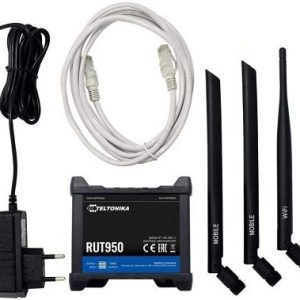
Teltonika RUT950 LTE 4G Router
Teltonika RUT950 LTE 4G Router
The Teltonika RUT950 is a professional-grade industrial LTE Cat 4 router delivering reliable 4G connectivity for mission-critical applications.
Cellular Performance:
- LTE Cat 4: 150 Mbps download / 50 Mbps upload
- Dual-SIM with automatic failover
- LTE bands: B1/B3/B7/B8/B20/B28A
- 3G HSPA+ fallback support
- 2x SMA cellular antenna connectors
Networking:
- 4x Gigabit Ethernet LAN ports
- 1x Gigabit Ethernet WAN port
- Wi-Fi 802.11b/g/n (2.4 GHz, 150 Mbps)
- Supports 100+ concurrent Wi-Fi users
- VLAN, QoS, traffic shaping
Industrial Features:
- RS232/RS485 serial interfaces
- 2x Digital inputs (0-30V)
- 2x Relay outputs (1A @ 50V)
- Integrated GPS receiver
- -40°C to 75°C operating range
Security & VPN:
- OpenVPN, IPsec, GRE, PPTP, L2TP
- Stateful firewall, DMZ, NAT
- MAC filtering, DDoS protection
- SMS remote control
Management:
- RMS cloud platform compatible
- SNMP, TR-069, RESTful API
- Web UI, SSH, SMS alerts
- OTA firmware updates
Construction:
- Aluminum housing, fanless design
- DIN rail mountable
- 9-30V DC power input
- CE/FCC certified
- 104 x 85 x 30 mm | 350g
Ideal for industrial IoT, SCADA, M2M, remote monitoring, backup connectivity, and mission-critical networks requiring rugged, reliable cellular internet.
SKU: n/a


There are no reviews yet.