Dell Docking Station D3100
The Dell Docking Station D3100 delivers comprehensive desktop connectivity and multi-monitor capability to any laptop through a single USB 3.0 connection, providing the perfect solution for users who need a complete workstation setup without permanent cable clutter.
This universal docking station transforms any USB 3.0 laptop into a powerful desktop environment with triple display support, extensive peripheral connectivity, and wired network access – all connected and disconnected with one cable.
Key Features
- Universal USB 3.0 connectivity
- Triple display support (HDMI + DisplayPort + VGA)
- 5 USB ports for peripherals
- Gigabit Ethernet connection
- Plug-and-play operation
- Cross-platform compatibility
- Compact desktop footprint
- 130W power adapter included
Display Capabilities
Triple Monitor Support:
- Simultaneous output to 3 external displays
- HDMI output (1920×1080 at 60Hz)
- DisplayPort output (1920×1080 at 60Hz)
- VGA output (1920×1080 at 60Hz)
- Extended or mirrored display modes
- Total of 4 screens including laptop display
Supported Configurations:
- 3 x Full HD (1920×1080) external monitors
- Plus laptop screen = 4 total displays
- Extended desktop for maximum productivity
- Individual display orientation settings
- Windows taskbar across multiple screens
Connectivity Options
USB Ports:
- 3 x USB 3.0 ports (5Gbps)
- 2 x USB 2.0 ports (480Mbps)
- Front and rear port placement
- Charge smartphones and tablets
- Connect keyboards, mice, printers
- External storage drives
- Webcams and peripherals
Network:
- Gigabit Ethernet (10/100/1000 Mbps)
- Realtek chipset
- Faster than Wi-Fi
- Reliable wired connection
- Network boot capable
Audio:
- 3.5mm headphone/speaker output
- 3.5mm microphone input
- Supports external speakers
- Headset connectivity
- Clear audio quality
Universal Compatibility
Operating Systems:
- Windows 7, 8, 8.1, 10, 11 (32/64-bit)
- Mac OS X 10.11 El Capitan or later
- Chrome OS R51 or later
- Ubuntu 14.04 or later
Compatible Laptops:
- Dell laptops (all models with USB 3.0)
- HP laptops
- Lenovo laptops
- ASUS laptops
- Acer laptops
- Any brand with USB 3.0 port
Plug-and-Play Setup
Easy Installation:
- Connect dock to power outlet
- Connect USB 3.0 cable to laptop
- Connect displays and peripherals
- Drivers install automatically (Windows)
- Ready to use in minutes
No Software Required:
- DisplayLink drivers install automatically
- Automatic updates (if online)
- No CD or downloads needed
- Works out of the box
Ideal Applications
Home Office:
- Multi-monitor productivity
- Professional workspace
- Video conferencing setup
- Document editing across screens
- Research and analysis
Hot-Desking:
- Shared workspace environments
- Quick connect/disconnect
- Personal laptop to desk setup
- Temporary workstation
- Flexible office arrangements
Business Travel:
- Hotel room workspace
- Client site presentations
- Temporary office setup
- Conference room connections
- Mobile professional solution
Education:
- Student dorm rooms
- Faculty offices
- Computer labs
- Distance learning setup
- Presentation systems
Creative Work:
- Photo editing across screens
- Video production workflow
- Graphic design workstation
- Content creation setup
- Multi-application workflows
Why Choose Dell D3100
- Universal compatibility (any USB 3.0 laptop)
- Triple display capability
- Single cable desktop connection
- Gigabit Ethernet included
- Comprehensive USB connectivity
- Plug-and-play simplicity
- Cross-platform support
- Compact design
Design & Build
- Compact rectangular form factor
- Dimensions: 180 x 90 x 28mm (approx.)
- Black matte finish
- Front and rear port access
- Ventilation slots for cooling
- LED power indicator
- Non-slip rubber feet
- Cable management channels
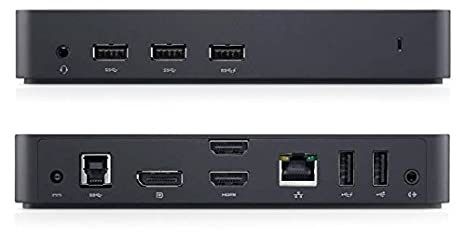
Port Layout
Front Panel:
- 1 x USB 3.0 port
- 1 x USB 2.0 port
- Headphone/microphone jacks
- LED status indicator
Rear Panel:
- 2 x USB 3.0 ports
- 1 x USB 2.0 port
- 1 x HDMI port
- 1 x DisplayPort
- 1 x VGA port
- 1 x Gigabit Ethernet (RJ-45)
- DC power input
- USB 3.0 upstream port (to laptop)
Performance Specifications
USB 3.0 Bandwidth:
- 5Gbps theoretical maximum
- Shared across all connections
- Sufficient for typical office use
- HD video streaming capable
- Fast file transfers
Display Performance:
- Full HD (1920×1080) at 60Hz
- Smooth video playback
- Adequate for productivity
- Not recommended for gaming
- Suitable for business applications
Use Case Scenarios
Financial Analyst:
- Spreadsheets across 3 monitors
- Real-time data on each screen
- Email and communication tools
- Research documents
- Maximum productivity
Software Developer:
- Code on one screen
- Documentation on another
- Terminal/console on third
- Testing on laptop screen
- Efficient workflow
Content Creator:
- Timeline on main display
- Preview on second screen
- Tools and assets on third
- Reference on laptop
- Professional editing setup
Administrative Professional:
- Email on one screen
- Documents on another
- Database on third
- Communication tools
- Multi-tasking capability
Power Management
- 130W AC power adapter included
- Powers dock and charges laptop (if supported)
- Automatic power-saving modes
- USB charging when laptop off
- Energy-efficient design
Limitations & Considerations
Display Resolution:
- Maximum 1920×1080 per display
- Not suitable for 4K workflows
- Limited to Full HD output
- 60Hz refresh rate
USB 3.0 Bandwidth:
- Shared across all functions
- May affect simultaneous high-bandwidth tasks
- Adequate for typical office use
- Not ideal for intensive data transfers while using displays
Graphics Performance:
- DisplayLink technology (software-based)
- Not suitable for gaming
- Not for GPU-intensive applications
- Designed for productivity, not graphics work
What’s Included
- Dell Docking Station D3100
- 130W AC power adapter with cord
- USB 3.0 upstream cable (to laptop)
- Quick start guide
- Safety and regulatory information
Cables Not Included:
- HDMI cable(s)
- DisplayPort cable(s)
- VGA cable(s)
- Ethernet cable
- USB peripheral cables
Setup Recommendations
Optimal Configuration:
- Connect high-resolution displays via HDMI/DisplayPort
- Use VGA for legacy monitor
- Position dock for easy access
- Manage cables with ties or channels
- Update drivers regularly
Best Practices:
- Connect dock before displays
- Allow drivers to install completely
- Restart laptop after first connection
- Keep DisplayLink software updated
- Use quality display cables
Troubleshooting Support
Common Solutions:
- Reinstall DisplayLink drivers
- Update to latest version
- Check USB 3.0 connection
- Verify display cable connections
- Restart laptop and dock
- Check power adapter connection
Warranty & Support
- Dell limited warranty (typically 1 year)
- Dell technical support available
- Driver updates from DisplayLink
- Online support resources
- Community forums
Comparison: D3100 vs Alternatives
D3100 Advantages:
- Universal compatibility
- Triple display support
- VGA included for legacy monitors
- Proven reliability
- Wide OS support
Consider Alternatives If:
- Need 4K display support
- Require Thunderbolt 3/4
- Want faster charging
- Need gaming performance
- Prefer brand-specific features
Accessories to Consider
- HDMI to DisplayPort adapters
- USB hub for additional ports
- Ethernet cable (Cat6)
- Cable management solutions
- Monitor stands or arms
- USB keyboard and mouse
Universal desktop connectivity in a single-cable solution – the Dell Docking Station D3100 transforms any USB 3.0 laptop into a complete multi-monitor workstation with comprehensive connectivity, making it perfect for home offices, hot-desking, and mobile professionals!


 DAYSGONE PS4 Game
1 × ₦45,047.00
DAYSGONE PS4 Game
1 × ₦45,047.00  Optoma S336 4000 Lumens High Contrast 3d Svga Dlp Projector
1 × ₦677,250.00
Optoma S336 4000 Lumens High Contrast 3d Svga Dlp Projector
1 × ₦677,250.00 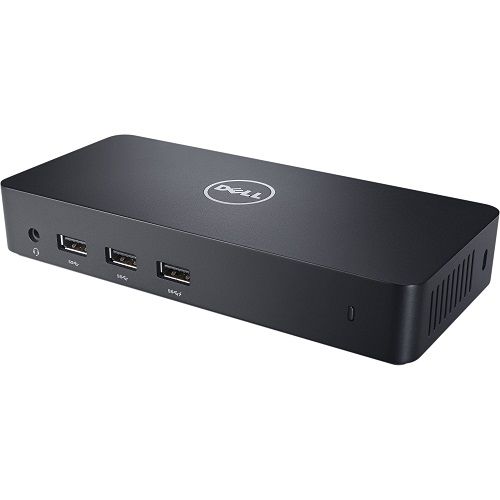


There are no reviews yet.