


HP, Officejet, PRINTERS, PRINTERS SCANNERS AND COPIERS
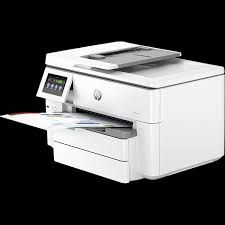
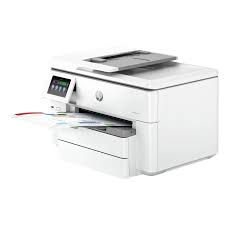
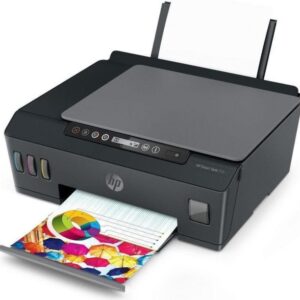
HP OfficeJet Pro 9730 All-in-One Printer
HP OfficeJet Pro 9730 All-in-One Printer
Tech specs
-
Connectivity, standard:
1 Ethernet; 1 Hi-Speed USB 2.0 (device); 1 Hi-Speed USB 2.0 (host); 1 Wi-Fi 802.11 a/b/g/n/ac (dual band)
-
Mobile printing capability:
Chrome OS; HP Smart app; Apple AirPrint™; Mobile Apps; Wi-Fi® Direct Printing; Mopria™ Certified 8
-
Duty cycle (monthly, A4):
Up to 30,000 pages
-
Duty cycle (monthly, letter):
Up to 30,000 pages
-
Paper handling input, standard:
250-sheet input tray, 250-sheet plain paper tray,
-
Print technology:
HP Thermal Inkjet
-
Borderless printing:
Yes (up to A3/11 x 17-in)
-
Scan resolution, optical:
Up to 1200 dpi
₦397,500.00
HP Officejet Pro 9730 All-in-One Printer
| Functions | Print, copy, scan |
|---|---|
| Print speed black (ISO) | Up to 22 ppm |
| Print speed black (draft, letter) | Up to 34 ppm |
| Print speed black (draft, A4) | Up to 34 ppm |
| Print speed black (ISO, letter) | Up to 22 ppm |
| Print speed black (ISO, A4) | Up to 22 ppm |
| Print speed black (best, A4) | Up to 5 ppm |
| Print speed color (ISO) | Up to 18 ppm |
| Print speed color (draft, letter) | Up to 34 ppm |
| Print speed color (draft, A4) | Up to 34 ppm |
| Print speed color (ISO) | Up to 18 ppm |
| Print Speed Color (ISO) | Up to 18 ppm |
| First page out black (letter, ready) | As fast as 12 sec |
| First page out black (A4, ready) | As fast as 12 sec |
| First page out color (letter, ready) | As fast as 13 sec |
| First page out color (A4, ready) | As fast as 13 sec |
| Duplex printing | Automatic |
| Duty cycle (monthly, letter) | Up to 30,000 pagesUp to 30,000 pages (Duty cycle is the maximum number of pages that can be printed in a month, but this page volume is not recommended on an ongoing basis.) |
| Duty cycle (monthly, A4) | Up to 30,000 pages (Duty cycle is the maximum number of pages that can be printed in a month, but this page volume is not recommended on an ongoing basis.) |
| Recommended monthly page volume | 250 to 1500 1 (HP recommends the number of pages printed not exceed the recommended monthly page volume for optimum device performance.) |
| Print quality black (best) | Up to 1200 x 1200 rendered dpi |
| Print quality color (best) | Up to 4800 by 1200 optimized dpi on HP Advance Photo Paper 1200 by 1200 dpi input |
| Print languages | HP PCL 3 GUI, HP PCL 3 Enhanced |
| Print technology | HP Thermal Inkjet |
| Connectivity, standard | 1 Ethernet; 1 Hi-Speed USB 2.0 (device); 1 Hi-Speed USB 2.0 (host); 1 Wi-Fi 802.11 a/b/g/n/ac (dual band) |
| Mobile printing capability | Chrome OS; HP Smart app; Apple AirPrint™; Mobile Apps; Wi-Fi® Direct Printing; Mopria™ Certified 2 |
| Network capabilities | Yes, via built-in Ethernet; Wireless 802.11a/b/g/n/ac |
| Wireless capability | Yes, with built-in dual-band Wi-Fi 802.11 a/b/g/n/ac and a self-heal solution |
| Wireless technologies | 802.11 a/b/g/n/ac 1×1 (2.4/5 GHz) with (BLE). |
| Minimum System Requirements for Macintosh | Apple® macOS v11 Big Sur, macOS v12 Monterey, macOS v13 Ventura; 2 GB HD; Internet required |
| Minimum System Requirements | Microsoft® Windows® 11, 10: 32-bit or 64-bit; 2 GB available hard disk space; Internet connection; Microsoft® Internet Explorer or Edge |
| Digital sending standard features | Scan to PC; Scan to Memory Device; Scan to email |
| Display | 4.3″ LCD (color) with Cap Sense touchscreen function |
| Processor speed | 1.2 GHz |
| Maximum Memory | 512 MB |
| Memory | 512 MBNone (None) |
| Internal Storage | Not Supported |
| Compatible Operating Systems | Windows 11; Windows 10; macOS 11 Big Sur; macOS 12 Monterey; macOS 13 Ventura; macOS 14 Sonoma; Linux; Chrome OS 3 (Windows Server 2016 64-bit, Windows Server 2019 64-bit, Windows Server 2022 64-bit; Linux (For more information see http://developers.hp.com/hp-linux-imaging-and-printing)) |
| Paper handling input, standard | 250-sheet input tray, 250-sheet plain paper tray, |
| Paper handling output, standard | 75-sheet output tray |
| Paper handling input, optional | No |
| Finished output handling | Sheetfed |
| Media types | Plain; HP EcoFFICIENT; HP Premium Presentation Matte 120g; HP Tri-fold Brochure Glossy 180g; HP Brochure Matte 180g; HP Brochure Glossy 180g; HP Advanced Photo Papers; Light 60-74g |
| Media sizes supported | A4; A5; A6; B5 (JIS); Envelope (DL, C5, C6, Chou #3, Chou #4); Card (Hagaki); A3 |
| Media sizes, custom | Tray 1: 76 x 127 to 297 x 420 mm; Tray 2: 210 x 297 to 297 x 420 mm |
| Borderless printing | Yes (up to A3/11 x 17-in) |
| Media weight, recommended | 60 to 105 g/m² |
| File Format Supported | PDF; TIFF; JPEG |
| Scanner type | Flatbed, ADF |
| Scan file format | Scan File Type supported by Software: Bitmap (.bmp), JPEG (.jpg), PDF (.pdf), PNG (.png), Rich Text (.rtf), Searchable PDF (.pdf), Text (.txt), TIFF (.tif) |
| Scan resolution, optical | Up to 1200 dpi |
| Scan resolution, hardware | Up to 1200 x 1200 dpi |
| Scan size (ADF), maximum | 216 x 356mm |
| Scan size, maximum | 297 x 432 mm |
| Scan speed (normal, A4) | Up to 8/6 ipm (B&W/Color 200 ppi) |
| Scan speed duplex (normal, A4) | Up to 14/11 ipm(B&W/Color 200 ppi) |
| Automatic document feeder capacity | Standard, 35 sheets |
| Scan technology | Contact Image Sensor (CIS) |
| Copy Speed Black (maximum, A4) | 4 Copy speeds may vary depending on the type of document. |
| Copy speed black (ISO) | Up to 18 cpm 4 |
| Copy speed color (ISO) | Up to 13 cpm 4 |
| Copy speed black (best, A4) | Up to 4 cpm 4 |
| Copy speed color (best, A4) | Up to 4 cpm 4 |
| Copy resolution (black text) | Up to 600 dpi |
| Copy resolution (color text and graphics) | Up to 600 dpi |
| Copy resolution (black graphics) | Up to 600 dpi |
| Copies, maximum | Up to 99 copies |
| Copy reduce / enlarge settings | 25 to 400% |
| Copier settings | Copies; Size; Quality; Tray Selection; Lighter/Darker; Paper size; Resize; Paper Type; Two-sided; ID Copy, Collate; binding Margin; Enhancement; Crop; Copy preview |
| Fax Transmission Speed | 5 (Analog Fax not supported) |
| Fax memory | (Analog Fax not supported) |
| Power consumption | 0.11 watts (Manual-Off), 5.40 watts (Standby), 1.39 watts (Sleep)None |
| Power | Input voltage: 100 to 240 VAC (+/- 10%), 50/60 Hz |

There are no reviews yet.