

Dell Docking Station D3100
Dell Docking Station D3100
Universal USB 3.0 docking station designed to transform your laptop into a complete desktop workstation with triple display support and comprehensive connectivity.
The Dell Docking Station D3100 provides seamless desktop expansion via single USB 3.0 connection, supporting up to three Full HD displays simultaneously through HDMI, DisplayPort, and VGA outputs. This plug-and-play dock features 5 USB ports (3 x USB 3.0, 2 x USB 2.0), Gigabit Ethernet, and 3.5mm audio jacks for comprehensive peripheral connectivity. Compatible with Windows, Mac, Chrome OS, and Ubuntu systems – works with virtually any laptop with USB 3.0 port, regardless of brand. Ideal for hot-desking environments, home offices, and users who need quick connection/disconnection. No software installation required, powered by included AC adapter.
Specifications:
- Connection: USB 3.0 Type-A (single cable to laptop)
- Display Outputs: 1 x HDMI, 1 x DisplayPort, 1 x VGA
- Maximum Displays: 3 simultaneous displays (including laptop screen = 4 total)
- Max Resolution: 1920×1080 (Full HD) per display at 60Hz
- USB Ports: 3 x USB 3.0, 2 x USB 2.0
- Network: Gigabit Ethernet (10/100/1000)
- Audio: Headphone/speaker out, microphone in
- Power: 130W AC adapter included
- Compatibility: Windows 7/8/10/11, Mac OS 10.11+, Chrome OS, Ubuntu
Universal docking solution for any USB 3.0 equipped laptop.
₦229,995.00
Dell Docking Station D3100
The Dell Docking Station D3100 delivers comprehensive desktop connectivity and multi-monitor capability to any laptop through a single USB 3.0 connection, providing the perfect solution for users who need a complete workstation setup without permanent cable clutter.
This universal docking station transforms any USB 3.0 laptop into a powerful desktop environment with triple display support, extensive peripheral connectivity, and wired network access – all connected and disconnected with one cable.
Key Features
- Universal USB 3.0 connectivity
- Triple display support (HDMI + DisplayPort + VGA)
- 5 USB ports for peripherals
- Gigabit Ethernet connection
- Plug-and-play operation
- Cross-platform compatibility
- Compact desktop footprint
- 130W power adapter included
Display Capabilities
Triple Monitor Support:
- Simultaneous output to 3 external displays
- HDMI output (1920×1080 at 60Hz)
- DisplayPort output (1920×1080 at 60Hz)
- VGA output (1920×1080 at 60Hz)
- Extended or mirrored display modes
- Total of 4 screens including laptop display
Supported Configurations:
- 3 x Full HD (1920×1080) external monitors
- Plus laptop screen = 4 total displays
- Extended desktop for maximum productivity
- Individual display orientation settings
- Windows taskbar across multiple screens
Connectivity Options
USB Ports:
- 3 x USB 3.0 ports (5Gbps)
- 2 x USB 2.0 ports (480Mbps)
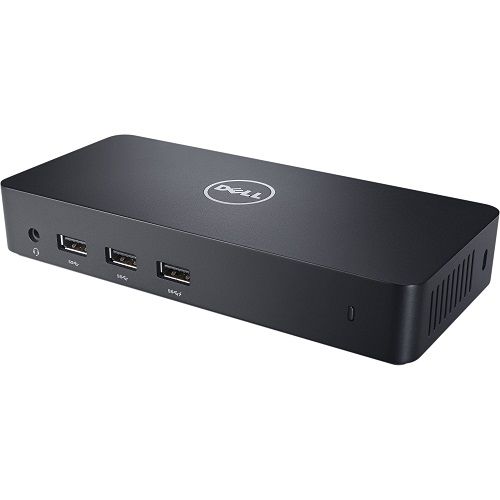
- Front and rear port placement
- Charge smartphones and tablets
- Connect keyboards, mice, printers
- External storage drives
- Webcams and peripherals
Network:
- Gigabit Ethernet (10/100/1000 Mbps)
- Realtek chipset
- Faster than Wi-Fi
- Reliable wired connection
- Network boot capable
Audio:
- 3.5mm headphone/speaker output
- 3.5mm microphone input
- Supports external speakers
- Headset connectivity
- Clear audio quality
Universal Compatibility
Operating Systems:
- Windows 7, 8, 8.1, 10, 11 (32/64-bit)
- Mac OS X 10.11 El Capitan or later
- Chrome OS R51 or later
- Ubuntu 14.04 or later
Compatible Laptops:
- Dell laptops (all models with USB 3.0)
- HP laptops
- Lenovo laptops
- ASUS laptops
- Acer laptops
- Any brand with USB 3.0 port
Plug-and-Play Setup
Easy Installation:
- Connect dock to power outlet
- Connect USB 3.0 cable to laptop
- Connect displays and peripherals
- Drivers install automatically (Windows)
- Ready to use in minutes
No Software Required:
- DisplayLink drivers install automatically
- Automatic updates (if online)
- No CD or downloads needed
- Works out of the box
Ideal Applications
Home Office:
- Multi-monitor productivity
- Professional workspace
- Video conferencing setup
- Document editing across screens
- Research and analysis
Hot-Desking:
- Shared workspace environments
- Quick connect/disconnect
- Personal laptop to desk setup
- Temporary workstation
- Flexible office arrangements
Business Travel:
- Hotel room workspace
- Client site presentations
- Temporary office setup
- Conference room connections
- Mobile professional solution
Education:
- Student dorm rooms
- Faculty offices
- Computer labs
- Distance learning setup
- Presentation systems
Creative Work:
- Photo editing across screens
- Video production workflow
- Graphic design workstation
- Content creation setup
- Multi-application workflows
Why Choose Dell D3100
- Universal compatibility (any USB 3.0 laptop)
- Triple display capability
- Single cable desktop connection
- Gigabit Ethernet included
- Comprehensive USB connectivity
- Plug-and-play simplicity
- Cross-platform support
- Compact design
Design & Build
- Compact rectangular form factor
- Dimensions: 180 x 90 x 28mm (approx.)
- Black matte finish
- Front and rear port access
- Ventilation slots for cooling
- LED power indicator
- Non-slip rubber feet
- Cable management channels
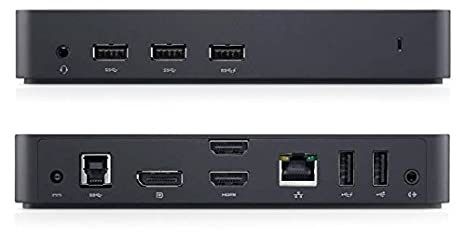
Port Layout
Front Panel:
- 1 x USB 3.0 port
- 1 x USB 2.0 port
- Headphone/microphone jacks
- LED status indicator
Rear Panel:
- 2 x USB 3.0 ports
- 1 x USB 2.0 port
- 1 x HDMI port
- 1 x DisplayPort
- 1 x VGA port
- 1 x Gigabit Ethernet (RJ-45)
- DC power input
- USB 3.0 upstream port (to laptop)
Performance Specifications
USB 3.0 Bandwidth:
- 5Gbps theoretical maximum
- Shared across all connections
- Sufficient for typical office use
- HD video streaming capable
- Fast file transfers
Display Performance:
- Full HD (1920×1080) at 60Hz
- Smooth video playback
- Adequate for productivity
- Not recommended for gaming
- Suitable for business applications
Use Case Scenarios
Financial Analyst:
- Spreadsheets across 3 monitors
- Real-time data on each screen
- Email and communication tools
- Research documents
- Maximum productivity
Software Developer:
- Code on one screen
- Documentation on another
- Terminal/console on third
- Testing on laptop screen
- Efficient workflow
Content Creator:
- Timeline on main display
- Preview on second screen
- Tools and assets on third
- Reference on laptop
- Professional editing setup
Administrative Professional:
- Email on one screen
- Documents on another
- Database on third
- Communication tools
- Multi-tasking capability
Power Management
- 130W AC power adapter included
- Powers dock and charges laptop (if supported)
- Automatic power-saving modes
- USB charging when laptop off
- Energy-efficient design
Limitations & Considerations
Display Resolution:
- Maximum 1920×1080 per display
- Not suitable for 4K workflows
- Limited to Full HD output
- 60Hz refresh rate
USB 3.0 Bandwidth:
- Shared across all functions
- May affect simultaneous high-bandwidth tasks
- Adequate for typical office use
- Not ideal for intensive data transfers while using displays
Graphics Performance:
- DisplayLink technology (software-based)
- Not suitable for gaming
- Not for GPU-intensive applications
- Designed for productivity, not graphics work
What’s Included
- Dell Docking Station D3100
- 130W AC power adapter with cord
- USB 3.0 upstream cable (to laptop)
- Quick start guide
- Safety and regulatory information
Cables Not Included:
- HDMI cable(s)
- DisplayPort cable(s)
- VGA cable(s)
- Ethernet cable
- USB peripheral cables
Setup Recommendations
Optimal Configuration:
- Connect high-resolution displays via HDMI/DisplayPort
- Use VGA for legacy monitor
- Position dock for easy access
- Manage cables with ties or channels
- Update drivers regularly
Best Practices:
- Connect dock before displays
- Allow drivers to install completely
- Restart laptop after first connection
- Keep DisplayLink software updated
- Use quality display cables
Troubleshooting Support
Common Solutions:
- Reinstall DisplayLink drivers
- Update to latest version
- Check USB 3.0 connection
- Verify display cable connections
- Restart laptop and dock
- Check power adapter connection
Warranty & Support
- Dell limited warranty (typically 1 year)
- Dell technical support available
- Driver updates from DisplayLink
- Online support resources
- Community forums
Comparison: D3100 vs Alternatives
D3100 Advantages:
- Universal compatibility
- Triple display support
- VGA included for legacy monitors
- Proven reliability
- Wide OS support
Consider Alternatives If:
- Need 4K display support
- Require Thunderbolt 3/4
- Want faster charging
- Need gaming performance
- Prefer brand-specific features
Accessories to Consider
- HDMI to DisplayPort adapters
- USB hub for additional ports
- Ethernet cable (Cat6)
- Cable management solutions
- Monitor stands or arms
- USB keyboard and mouse
Universal desktop connectivity in a single-cable solution – the Dell Docking Station D3100 transforms any USB 3.0 laptop into a complete multi-monitor workstation with comprehensive connectivity, making it perfect for home offices, hot-desking, and mobile professionals!
Based on 0 reviews
Be the first to review “Dell Docking Station D3100”
Related products
-
-
-
COMPUTER ACCESSORIES, Keyboards & Mouse
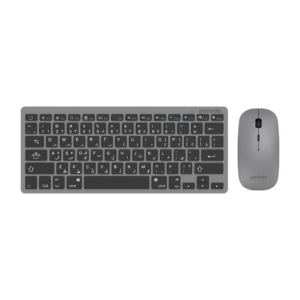
Porodo Super slim and Portable Bluetooth Keyboard with Mouse (Eng and Arabic) -Gray
 COMPUTER ACCESSORIES, Keyboards & Mouse
Porodo Super slim and Portable Bluetooth Keyboard with Mouse (Eng and Arabic) -Gray
Porodo Super slim and Portable Bluetooth Keyboard with Mouse (Eng and Arabic) -Gray
Specifications
- Operating current: 3V 0.6mW
- Keys structure: Scissor type
- Sensor type: Optical
- Sensitivity: 800-1600 DPI
Features
WirelessSuper SlimPortable Bluetooth KeyboardUltra-Thin LightweightSKU: n/a

There are no reviews yet.